What is AddThis?
AddThis is one of those services that can be implemented on your site or blog which publish your page or site in social networking sites. These services (there are various providers and they tend to be free), invite you to ‘Share This Page’ and when you click on the logos of your favourite social networking site, the page is published on your wall in Facebook or as a tweet on twitter, so your friends can see what pages you are reading, what you like,...
Analytics for AddThis
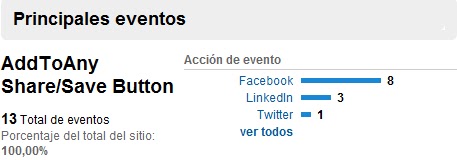
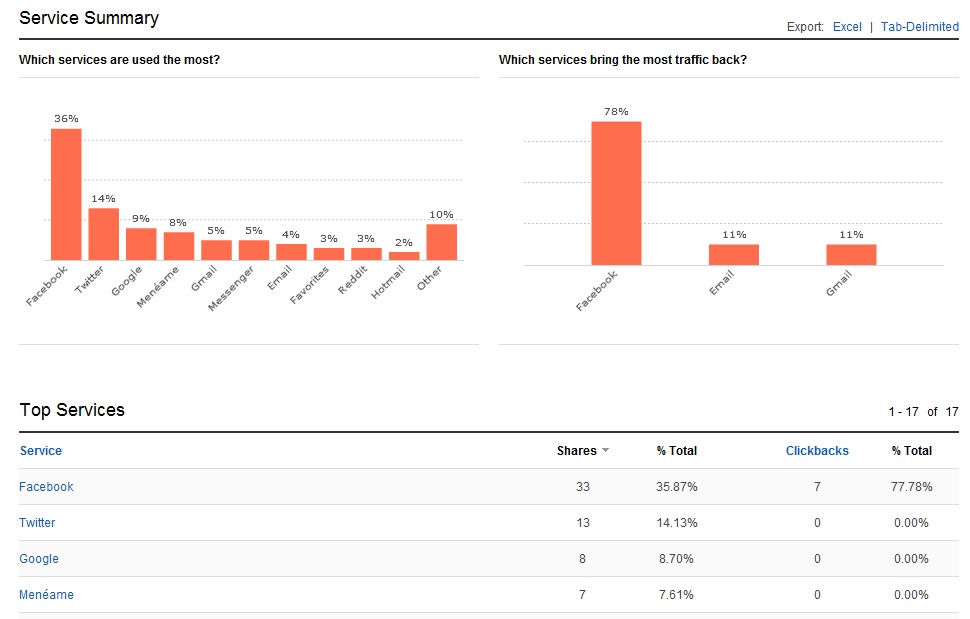
Recently I compared the data and analytics provided by AddThis with some other services. AddThis has a very good analytics section on their page, in which you can see how many times people share your pages on different social media platforms, how much traffic this sharing brought back, what content was mostly shared,...
New Features
Just before Christmas, AddThis launched some new features for their analytics section, which are pretty cool, I must say.
Just before Christmas, AddThis launched some new features for their analytics section, which are pretty cool, I must say.

The improvements are based on 2 characteristics of this service:
1. AddThis is used on various sites. This means that AddThis has the power to cross-track shares and visits of people on different sites: for instance, if I share content from a Sports site using AddThis and afterwards I share content from a Music site using AddThis, AddThis knows that I’m the same person who shares (and hence most likely ‘like’) both topics of Sports and Music. Considerations about privacy aside (maybe we don’t like/want AddThis to know all this about us), all this represents great Insights for website owners who use AddThis: visitors who share the content of my site – what other content do they like/share?
2. AddThis is an external provider. This means that if you use it on your site, you need to implement a little code on your site, which is external. By doing this, you actually give access to AddThis to obtain data of your site. AddThis can track how many people come to your site, how they got to your site, what they do on the site… This is all very valuable information, and you when you implement AddThis, you give this information to an external party for free. So it might just be good that AddThis uses this information to give value back to the websites who give free data to them.
Important parenthesis:
Other services, like ShareThis, also have these characteristics and are also able to cross-track visitors who share on different sites, and they can also track all the analytics of your page. ShareThis already started in the summer of 2010 to use both ways to give cross-track and competative data to the users. I discussed this information in this post.
Back to AddThis:
In my opinion, the 2 most important new features are the following:
Audience:
AddThis uses the information it has from shares via AddThis on other sites to report on the Audience's interests: what the people who come to your site ‘also like’. So you can see if ‘Sharers’ of your content also like Sports, or Music.
It's important to note that if you have very few shares or your visitors don't share much on sites which use AddThis, maybe you won't have enough data to get something usefull from this.
It's important to note that if you have very few shares or your visitors don't share much on sites which use AddThis, maybe you won't have enough data to get something usefull from this.
Searches & Referrers: AddThis starts using the information of where the visitors who share content of your site come from. It gives 2 reports: First the 'Searches', which represents the keywords people use in search engines to come to your site and which visits resulted in shares of your pages. Second there is the Referrers report, which represent the sites people visited before coming to your site and sharing a page.

Of course, it would be massive to see these Searches & Referrers crossed also with the click-backs, not only with the Shares: what searches resulted in people sharing and did those shares also resulted in people coming back to your site? This might be a something useful for a future launch.
More new features of AddThis Analytics
There are some other new features which are also pretty cool:
First AddThis introduces a metric called ‘Influencers’: AddThis used to report on the visitors who came to your site and shared content, and those visitors who came back after somebody shared content. Now there is a new metric, which is the number of the sharers who actually drive traffic back.

Then there is the new metric ‘Lift’: it represents the percentage of visits that the shares drive back: for instance, 100 Shares which bring back 20 visits represent 20% of Lift (=20/100).
AddThis also includes mentions and comments on Twitter and Facebook. This is a form of Social Monitoring, which is not new. Though it is nice that it comes integrated in another Analytics platform, so you have both the ‘Social Bookmarking’ data from AddThis and the Social Monitoring in 1 application.
Another improvement is the Countries report, which shows in which country your content is shared and click-backed. Before these new features, AddThis only showed continents, which wasn’t a particularly enlightening way of representing where people were sharing your content.
Feedback
When launching all these new features, AddThis asked about feedback. First of all, I'd like to say AddThis has done a great job with these new features. Some comments:
My first comment would be an obvious one: it would be nice if all these features were integrated in Google Analytics and other Web Analytics tools. I know this is not easy and will take time, but still.
Second, ShareThis has a competitive feature, where it compares how many people share content on your site with how many people share on similar sites. Such a report is very actionable: it gives a great idea whether you can improve shares or not. So it would be great if AddThis also worked on this.
When launching all these new features, AddThis asked about feedback. First of all, I'd like to say AddThis has done a great job with these new features. Some comments:
My first comment would be an obvious one: it would be nice if all these features were integrated in Google Analytics and other Web Analytics tools. I know this is not easy and will take time, but still.
Second, ShareThis has a competitive feature, where it compares how many people share content on your site with how many people share on similar sites. Such a report is very actionable: it gives a great idea whether you can improve shares or not. So it would be great if AddThis also worked on this.
Third: it would be nice to start include ‘Site goals’ in the analytics of AddThis. I've discussed this before when comparing the Analytics of various sharing providers, and I don’t think it can be that difficult to develop an integrated method (with some kind of pixel or tracking which can be implemented in the ThankYou – pages) to see what all this sharing and clicking-back helps with achieving the goals for your site.
Related post:
To see all the features, you can watch this video of AddThis: